# Blocking phone numbers from CLI in Sailfish OS
### [ Blocking phone numbers from CLI in Sailfish OS ](https://www.ncartron.org/blocking-phone-numbers-from-cli-in-sailfish-os.html)
February 18, 2025 — Nico Cartron
---
With Sailfish OS 5, it is now possible to block incoming calls, which is especially useful for unwanted calls such as spam calls.
## From the SFOS UI
- in the Phone application, go to "History"
- then long press on the phone number you want to block
- then select "Block Number"
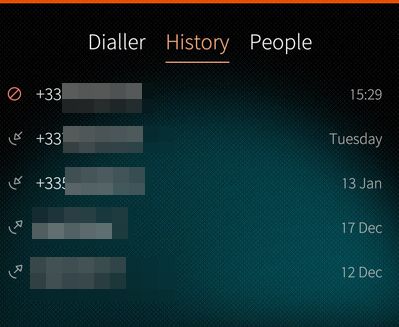
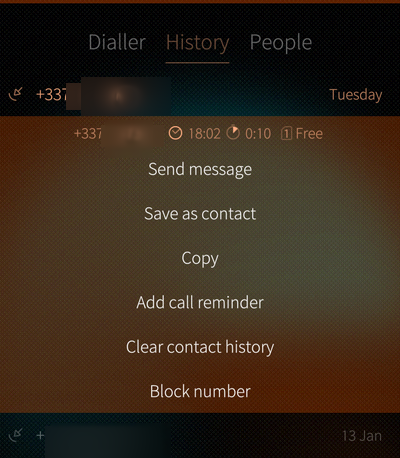Next time this number calls you, it will go directly to your voicemail, and you'll see it in the calls history with a "blocked" icon:
## Using the CLI
You can also do this using SFOS CLI, which comes with the benefit of being able to also specify *ranges* of numbers - useful for countries where sales calls are due to originate from specific prefixes.
For instance in France, those numbers start with *+33949* (and a bunch of other prefixes).
To block this range in SFOS, I would type the following command (as `defaultuser` user):
```
dconf write /sailfish/voicecall/filter/rejected-numbers ["'^+33949'"]
```
and to check that this was taken into account:
```
dconf read /sailfish/voicecall/filter/rejected-numbers
```
## "Reject numbers" vs. "Ignore numbers"
If you're curious like me, you've probably seen that there are 2 options when it comes to filtering numbers in SFOS. If you enter that command:
```
dconf list /sailfish/voicecall/filter/
```
you'll get 2 answers:
```
ignored-numbers
rejected-numbers
```
We've used `rejected-numbers` above, now you may wonder what `ignored-numbers` is and what's the difference?
Well, fear not as I tested it for you:
- `rejected numbers` will send the call straight to your voicemail, without your caller even getting a ring on their side,
- `ignored-numbers` will still send the call to your voicemail, but after the usual 4 or 5 rings for your callers
- you will still see the call coming in,
- but your phone won't ring,
- and the call will also appear as "blocked" in your calls history
## Import settings for France
```shell
dconf write /sailfish/voicecall/filter/ignored-numbers "['', 'anonymous', '^+33162', '^+33163', '^+33270', '^+33271', '^+33377', '^+33378', '^+33424', '^+33425', '^+33568', '^+33569', '+3364466', '+3364467', '+3364468', '+3364469', '+337568', '+337569', '^+33806', '^+33948', '^+33949', '+5909475', '+5949476', '+2629478', '+2629479', '+5969477']"
```
---