Useful command-line settings
Settings that can't be reached from Sailfish OS graphical user interface.
Battery saving mode all the time
Sailfish OS (5.0) UI allows to start the battery saving mode / power saving mode at will from the Battery setting menu, and to set a threshold from which the battery saving mode is automatically enabled. This threshold can be chosen between 20%, 15%, 10%, 5%… But not higher than 20%.
Even if this mode isn't saving much battery, if you want to have it set all the time you can use this commands from the Terminal :
devel-su pkcon install mce-tools # to install the package that contains the mcetool command line program
mcetool --set-psm-threshold=100 --set-power-saving-mode=enabled --set-forced-psm=enable
This second line enables the power saving mode and sets it to auto-start from 100%. This way you'll be using your phone in power saving mode all the time except when it is plugged (loading the battery).
This setting is kept even after a reboot, just like if you had a 100% label available in the graphical Battery settings to click on.
This information have been summarized from this discussion : https://forum.sailfishos.org/t/please-add-function-for-automatic-power-saving-mode/7322
Blocking phone numbers from CLI in Sailfish OS
Blocking phone numbers from CLI in Sailfish OS
With Sailfish OS 5, it is now possible to block incoming calls, which is especially useful for unwanted calls such as spam calls.
From the SFOS UI
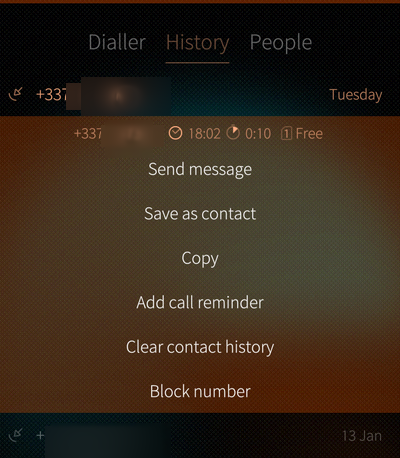
- in the Phone application, go to "History"
- then long press on the phone number you want to block
- then select "Block Number"
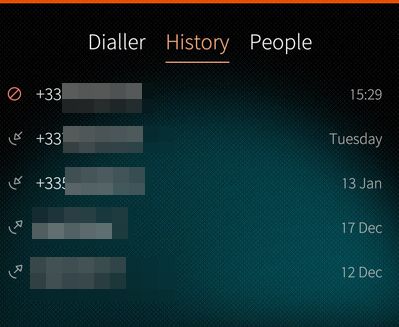
Next time this number calls you, it will go directly to your voicemail, and you'll see it in the calls history with a "blocked" icon:
Using the CLI
You can also do this using SFOS CLI, which comes with the benefit of being able to also specify ranges of numbers - useful for countries where sales calls are due to originate from specific prefixes.
For instance in France, those numbers start with +33949 (and a bunch of other prefixes).
To block this range in SFOS, I would type the following command (as defaultuser user):
dconf write /sailfish/voicecall/filter/rejected-numbers ["'^+33949'"]
and to check that this was taken into account:
dconf read /sailfish/voicecall/filter/rejected-numbers
"Reject numbers" vs. "Ignore numbers"
If you're curious like me, you've probably seen that there are 2 options when it comes to filtering numbers in SFOS. If you enter that command:
dconf list /sailfish/voicecall/filter/
you'll get 2 answers:
ignored-numbers
rejected-numbers
We've used rejected-numbers above, now you may wonder what ignored-numbers is and what's the difference?
Well, fear not as I tested it for you:
rejected numberswill send the call straight to your voicemail, without your caller even getting a ring on their side,ignored-numberswill still send the call to your voicemail, but after the usual 4 or 5 rings for your callers- you will still see the call coming in,
- but your phone won't ring,
- and the call will also appear as "blocked" in your calls history
Import settings for France
dconf write /sailfish/voicecall/filter/ignored-numbers "['', 'anonymous', '^+33162', '^+33163', '^+33270', '^+33271', '^+33377', '^+33378', '^+33424', '^+33425', '^+33568', '^+33569', '+3364466', '+3364467', '+3364468', '+3364469', '+337568', '+337569', '^+33806', '^+33948', '^+33949', '+5909475', '+5949476', '+2629478', '+2629479', '+5969477']"